Users, service accounts, and groups
Every permission in QuestDB is granted to a principal. This page covers the three kinds, how they differ, and the statements that manage them.
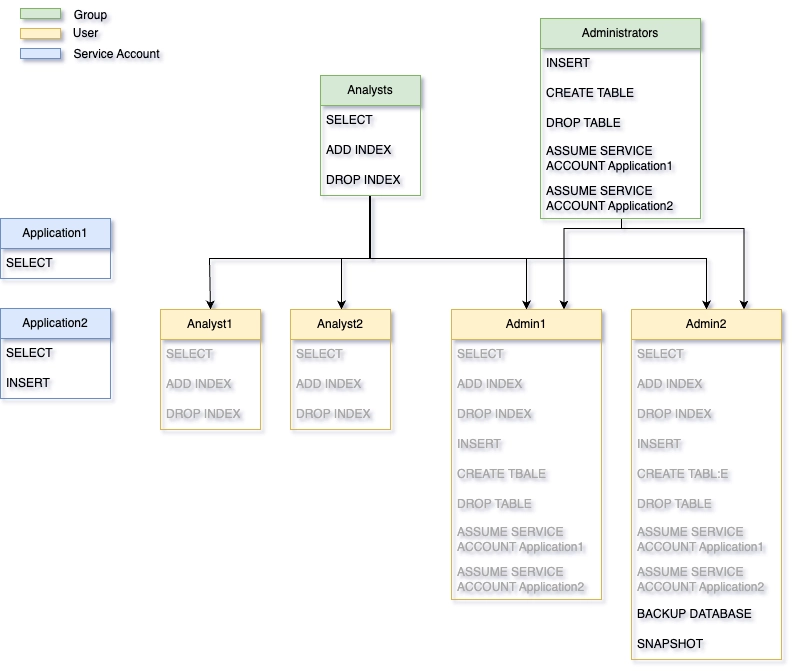
Users and service accounts
QuestDB has two account types:
- Users: For human individuals. Can belong to multiple groups and inherit permissions from them. Cannot be assumed by others.
- Service accounts: For applications. Cannot belong to groups - all permissions must be granted directly. Can be assumed by authorized users for testing.
CREATE USER human_user WITH PASSWORD 'pwd';
CREATE SERVICE ACCOUNT app_account WITH PASSWORD 'pwd';
Names must be unique across all users, service accounts, and groups.
Why service accounts?
Service accounts provide clean, testable application access:
| Aspect | User | Service Account |
|---|---|---|
| Permission source | Direct + inherited from groups | Direct only |
| Can belong to groups | Yes | No |
| Can be assumed (SU) | No | Yes |
| Typical use | Human individuals | Applications, services |
Because service accounts have no inherited permissions, their access is fully explicit and predictable. Combined with the ability to assume them, this makes it easy to verify exactly what an application can and cannot do:
-- Create service account with specific permissions
CREATE SERVICE ACCOUNT trading_app WITH PASSWORD 'pwd';
GRANT ILP TO trading_app;
GRANT INSERT ON trades TO trading_app;
GRANT SELECT ON positions TO trading_app;

-- Developer can assume the service account to test its access
GRANT ASSUME SERVICE ACCOUNT trading_app TO developer;

-- Developer switches to service account context
ASSUME SERVICE ACCOUNT trading_app;
-- Now operating with trading_app's exact permissions
-- Test what works and what doesn't...
EXIT SERVICE ACCOUNT;
This makes service accounts ideal for applications where you need predictable, auditable, and testable access control.
Service account assumption
Users can temporarily assume a service account's permissions for debugging:
-- Grant ability to assume
GRANT ASSUME SERVICE ACCOUNT ingest_app TO developer;

-- Developer can now switch context
ASSUME SERVICE ACCOUNT ingest_app;
-- ... debug with app's permissions ...
EXIT SERVICE ACCOUNT;
Groups
Groups simplify permission management when multiple users need the same access:
CREATE GROUP analysts;
GRANT SELECT ON ALL TABLES TO analysts;

-- All users added to this group can read all tables
ADD USER market_analyst TO analysts;
ADD USER risk_analyst TO analysts;
Users inherit permissions from their groups. Inherited permissions cannot be revoked directly from the user - revoke from the group instead. When a group is dropped, all members lose the permissions they inherited from that group.
For OIDC users, group membership comes from the Identity Provider rather than
from ADD USER. See
mapping groups and permissions.
Built-in admin
Every QuestDB instance starts with a built-in admin account:
- Default username:
admin - Default password:
quest
Change these immediately in production via server.conf:
acl.admin.user=your_admin_name
acl.admin.password=your_secure_password
The built-in admin has irrevocable root access. After creating other admin users, disable it:
acl.admin.user.enabled=false
In a replicated cluster, keep in mind that the built-in admin authorizes a
role switch from its own credentials,
independently of the replicated access lists. It is the break-glass account when
a SWITCH ROLE grant has not yet replicated to the node you need to promote.
Management reference
Creating and removing principals
-- Users
CREATE USER username WITH PASSWORD 'pwd';
DROP USER username;

-- Service accounts
CREATE SERVICE ACCOUNT appname WITH PASSWORD 'pwd';
DROP SERVICE ACCOUNT appname;

-- Groups
CREATE GROUP groupname;
DROP GROUP groupname;
Managing group membership
ADD USER username TO group1, group2;
REMOVE USER username FROM group1;
Passwords and tokens are managed with ALTER USER or
ALTER SERVICE ACCOUNT; see
managing authentication.
Viewing information
SHOW USERS;                    -- List all users
SHOW SERVICE ACCOUNTS;         -- List all service accounts
SHOW GROUPS;                   -- List all groups
SHOW GROUPS username;          -- List groups for a user
SHOW USER username;            -- Show auth methods for user
SHOW PERMISSIONS username;     -- Show permissions for user
SHOW USERS, SHOW GROUPS, and SHOW SERVICE ACCOUNTS also report each
entity's memory limit.
Example output from SHOW USER:
auth_type    enabled
---------    -------
Password     true
JWK Token    false
REST Token   true
Viewing other users' information requires LIST USERS (to list all) or
USER DETAILS (to see details) permissions. Users can always view their own
information without these permissions.
See also
- Authentication and endpoint access - how principals prove who they are and which protocols they may use
- Granting and revoking permissions - what a principal is allowed to do once connected