RBAC authentication and endpoint access
Connecting to QuestDB Enterprise takes two things: a credential the server accepts, and the endpoint permission for the protocol you are connecting over. A valid password is not enough on its own.
Authentication methods
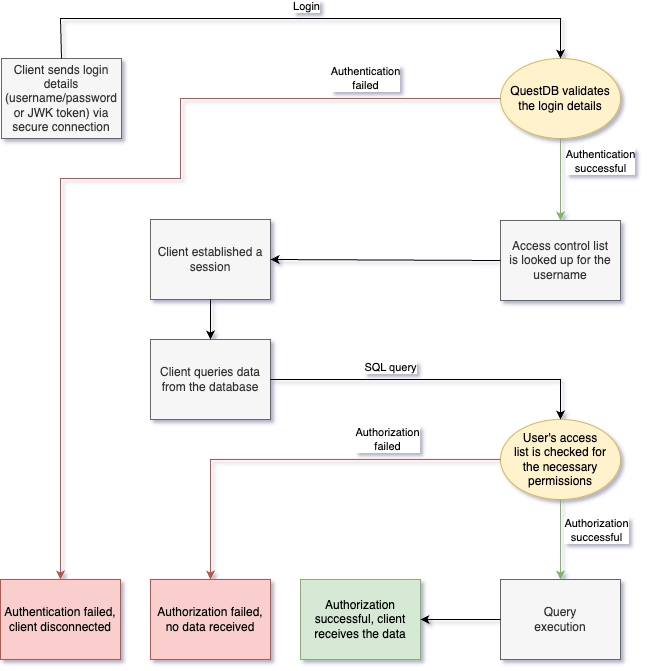
QuestDB supports four authentication methods:
| Method | Use case | Endpoints |
|---|---|---|
| Password | Interactive users | REST API and QWP, both under the HTTP permission; PostgreSQL Wire |
| JWK Token | ILP ingestion | InfluxDB Line Protocol |
| REST API Token | Programmatic HTTP access | REST API and QWP, both under the HTTP permission |
| OIDC bearer token | SSO users, external clients | REST API and QWP, both under the HTTP permission; PostgreSQL Wire once enabled |
The first three are QuestDB's own credentials, created with the statements below. An OIDC bearer token is issued by an external Identity Provider instead, and the user's group memberships come from the token or the provider's user info endpoint; see OpenID Connect and client integration patterns, including which token to send.
OIDC on the PostgreSQL Wire endpoint is off by default. Enable it with
acl.oidc.pg.token.as.password.enabled,
which accepts the token in the password field, or with
acl.oidc.ropc.flow.enabled,
which has QuestDB exchange the user's SSO credentials for a token itself.
Users can have multiple authentication methods enabled simultaneously:
-- Add JWK token for ILP access
ALTER USER sensor_writer CREATE TOKEN TYPE JWK;

-- Add REST API token (with 30-day expiry)
ALTER USER api_user CREATE TOKEN TYPE REST WITH TTL '30d';
QuestDB does not store private keys or tokens after creation. Save them immediately - they cannot be recovered.
Authentication should happen via a secure TLS connection to protect credentials in transit.
Endpoint permissions
Before a user can connect, they need endpoint permissions:
| Permission | Allows access to |
|---|---|
HTTP | REST API, Web Console, QWP, ILP over HTTP |
PGWIRE | PostgreSQL Wire Protocol (port 8812) |
ILP | InfluxDB Line Protocol TCP (port 9009) |
-- Typical setup for an interactive user
GRANT HTTP, PGWIRE TO analyst;

-- Typical setup for an ingestion service
GRANT ILP TO ingest_service;
Endpoint permissions are independent of data permissions. A user may hold
SELECT on every table and still be unable to connect, or hold ILP and be
able to ingest but never query.
Managing authentication
For a user:
-- Change password
ALTER USER username WITH PASSWORD 'new_pwd';

-- Remove password (disables password auth)
ALTER USER username WITH NO PASSWORD;

-- Create tokens
ALTER USER username CREATE TOKEN TYPE JWK;
ALTER USER username CREATE TOKEN TYPE REST WITH TTL '30d';
ALTER USER username CREATE TOKEN TYPE REST WITH TTL '1d' REFRESH;  -- Sliding expiry extension

-- Remove tokens
ALTER USER username DROP TOKEN TYPE JWK;
ALTER USER username DROP TOKEN TYPE REST;  -- Drops all REST tokens
ALTER USER username DROP TOKEN TYPE REST 'token_value_here';  -- Drop specific token
Use the parallel ALTER SERVICE ACCOUNT forms for an application identity:
ALTER SERVICE ACCOUNT service_account WITH PASSWORD 'new_pwd';
ALTER SERVICE ACCOUNT service_account WITH NO PASSWORD;

ALTER SERVICE ACCOUNT service_account CREATE TOKEN TYPE JWK;
ALTER SERVICE ACCOUNT service_account CREATE TOKEN TYPE REST WITH TTL '30d';

ALTER SERVICE ACCOUNT service_account DROP TOKEN TYPE JWK;
ALTER SERVICE ACCOUNT service_account DROP TOKEN TYPE REST;
See the ALTER USER and ALTER SERVICE ACCOUNT references for token refresh, expiry, and targeted REST-token removal. Removing every authentication method effectively disables that user or service account: it can no longer connect to the database.
See also
- OpenID Connect - SSO against an external Identity Provider
- TLS - encrypting credentials in transit
- Users, service accounts, and groups - the principals these credentials belong to