OpenID Connect (OIDC)
OpenID Connect (OIDC) enables SSO authentication with external Identity Providers.
OpenID Connect (OIDC) integrates with Identity Providers (IdP) external to QuestDB.
It is a convenient way to integrate QuestDB into your enterprise environment, and it provides SSO (Single Sign-On) for the Web Console.
Microsoft Active Directory and Azure AD, for example, can be turned into an Identity Provider.
Specific installation steps depend on the type of the provider.
Architecture overview
Altogether, the architecture appears as such:
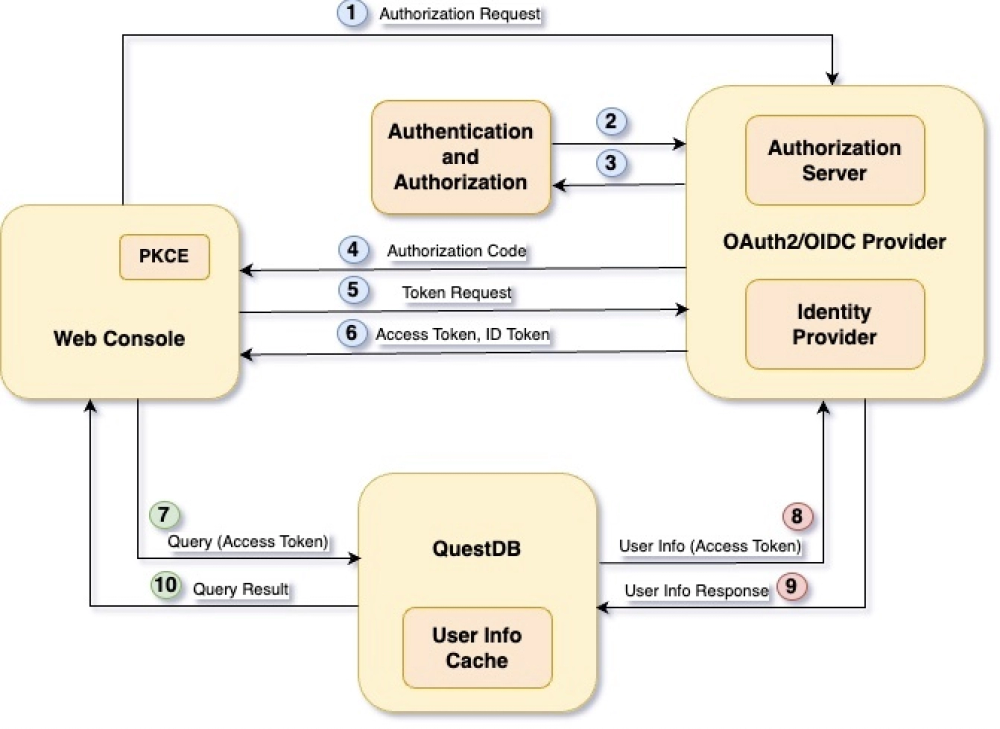
We can break it down into core components.
Web Console
QuestDB's interactive UI. Users must authenticate before accessing the database via the interface.
The Web Console uses PKCE (Proof Key for Code Exchange) to secure the authentication and authorization flow.
In OAuth2/OIDC terms, the Web Console is referred to as the client, and it is assigned an identifier: the Client Id.
Each application which integrates via OIDC should be given a different Client Id.
OIDC Provider
Typically consists of a number of modules.
We are interested in two of them only.
-
The Identity Provider holds user identities and user information, capable of authenticating users, and to issue an ID Token which uniquely identify them.
-
The Authorization Server grants access to resources, such as a database, in the form of access tokens.
The OIDC Provider usually integrates with a number of applications which require different access to a number of resources.
These clients communicate with the OIDC Provider via its endpoints.
It exposes a number of APIs, including the Authorization, Token and User Info endpoints.
QuestDB
The database, in OAuth2/OIDC terms the protected resource or resource server.
Only processes requests which contain the bearer token selected by its OIDC configuration: normally the access token, or the ID token when group memberships are encoded in it.
Where to go next
| Page | Covers |
|---|---|
| How sign-in works | The Authorization Code Flow with PKCE, step by step |
| Client discovery and tokens | The settings endpoint, and which of the two tokens to send |
| Device flow | Headless sign-in for a CLI, container, or notebook kernel |
| Client integration patterns | Browser clients, Jupyter, CLI tools, unattended jobs, PGWire |
| Mapping groups and permissions | Turning Identity Provider groups into QuestDB permissions |
| PingFederate | Provider setup walkthrough |
| Microsoft Entra ID | Provider setup walkthrough |
For the acl.oidc.* settings, see the
OIDC settings reference.
Where each section moved
These anchors are kept so that existing links keep working. Prefer the pages above when adding new links.
| Section | Now at |
|---|---|
| Authentication and authorization flow | How sign-in works |
| Secret generation | How sign-in works |
| Prove identity | How sign-in works |
| Scope consent | How sign-in works |
| Redirection | How sign-in works |
| Credential request | How sign-in works |
| Credentials received | How sign-in works |
| Database access | How sign-in works |
| Find user information | How sign-in works |
| Receive user information | How sign-in works |
| Permission check | How sign-in works |
| User permissions | Mapping groups and permissions |
| Mapping user permissions | Mapping groups and permissions |
| Interactive clients | Client integration patterns |
| Browser-based clients | Client integration patterns |
| Jupyter notebook | Client integration patterns |
| Externalizing credentials | Client integration patterns |
| Enable ROPC | Client integration patterns |
| CLI and standalone applications | Client integration patterns |
| Non-interactive clients | Client integration patterns |
| OIDC for the PGWire endpoint | Client integration patterns |
| Active Directory | PingFederate or Microsoft Entra ID |
| PingFederate | PingFederate |
| Set up PingFederate client | PingFederate |
| Access Token Manager settings | PingFederate |
| Authorization Server settings | PingFederate |
| Set up a Microsoft Entra ID Data Source | PingFederate |
| Set up a Password Credential Validator | PingFederate |
| Set up an Identity Provider | PingFederate |
| Add groups to OIDC policy management | PingFederate |
| Enable Resource Owner Password Credentials flow | PingFederate |
| QuestDB configuration for PingFederate | PingFederate |
| Confirm QuestDB mappings and login | PingFederate |
| Microsoft Entra ID | Microsoft Entra ID |
| Set up the client application in Entra ID | Microsoft Entra ID |
| QuestDB configuration | Microsoft Entra ID |
| Map groups and grant permissions | Microsoft Entra ID |
| Confirm group mappings and login | Microsoft Entra ID |
| Configuration options | OIDC settings |
See also
- OIDC settings reference - configure QuestDB and its Identity Provider connection
- Role-based access control - grant endpoint and data permissions after authentication
- TLS - protect credentials and tokens in transit