Mapping OIDC groups and permissions
OIDC group mapping and authorization are available in QuestDB Enterprise.
QuestDB does not store permissions for an OIDC user. It reads the user's group memberships out of the Identity Provider and maps them onto QuestDB groups, which carry the permissions. This page covers where those memberships come from, how to create the mapping, and what happens when a claim is missing.
User permissions
QuestDB requires additional user information to be able to construct the user's access list.
As a reminder, the access list is the list of permissions that determines what the user can and cannot do.
QuestDB itself does not store external users, nor their passwords or any other authentication related detail.
External users and their authentication methods are managed by the Identity Provider.
Since external users are not managed by QuestDB, permissions cannot be granted to them directly.
Instead, the database expects a list of groups, called the groups claim to be present in the user information.
These external group names are mapped to QuestDB's own groups.
The access list of the external user consists of the permissions granted to those groups:
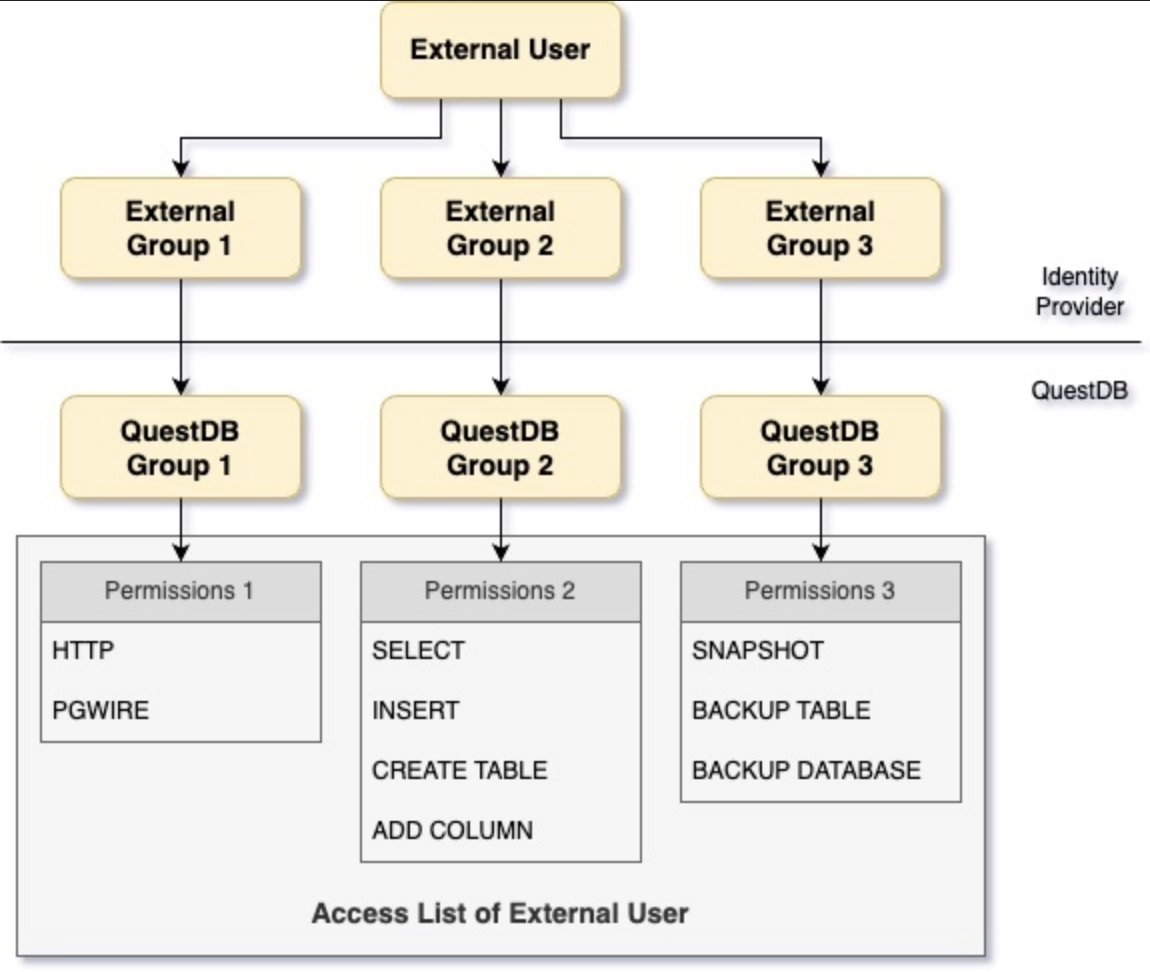
Mapping user permissions
The mappings between external and QuestDB groups are managed with CREATE GROUP and ALTER GROUP:
CREATE GROUP groupName WITH EXTERNAL ALIAS 'CN=TestGroup1,OU=DC Users,DC=ad,DC=quest,DC=dev';
ALTER GROUP groupName WITH EXTERNAL ALIAS 'CN=TestGroup1,OU=DC Users,DC=ad,DC=quest,DC=dev';
ALTER GROUP groupName DROP EXTERNAL ALIAS 'CN=TestGroup1,OU=DC Users,DC=ad,DC=quest,DC=dev';
The external alias establishes membership; it does not grant access by itself. Grant endpoint and data permissions to the mapped QuestDB group, for example:
GRANT HTTP TO groupName;
GRANT SELECT ON trades TO groupName;
Every external user mapped to groupName receives those permissions. See
Granting permissions for endpoint,
table, column, and system-level examples.
External users cannot be given a query memory limit directly;
ALTER USER ... SET MEMORY LIMIT is rejected for them. Set the limit on the
mapped QuestDB group instead; see
per-principal query memory limits.
QuestDB can obtain the list of external groups from either the User Info
response or the ID token. By default, it reads them from the User Info
response. When
acl.oidc.groups.encoded.in.token
is true, it reads them from the ID token instead; this mode supports providers
such as Entra ID, which cannot return groups from the User Info endpoint.
In the User Info example below, the response contains a claim called
groups. Its name is set with
acl.oidc.groups.claim, which
has no default and must be set whenever OIDC is enabled.
If the groups claim is missing or it is an empty list, authentication fails. The
same happens when the claim named by
acl.oidc.sub.claim is missing or
empty. Over HTTP QuestDB replies with 401 Unauthorized, while on the PGWire
endpoint the client receives an authentication error. Either way the reason is
only visible in the server log.
The user has to have at least the HTTP permission to be able to successfully
login via the Web Console.
{
  "sub": "externalUser",
  "name": "External User",
  "groups": [
    "CN=TestGroup1,OU=DC Users,DC=ad,DC=quest,DC=dev",
    "CN=TestGroup2,OU=DC Users,DC=ad,DC=quest,DC=dev"
  ]
}
How quickly an Identity Provider change takes effect depends on where QuestDB reads the groups:
- User Info response, the default: after the cached authentication entry
expires, the next authentication calls the User Info endpoint again and
rebuilds the access list. Configure that interval with
acl.oidc.cache.ttl. - ID token, when
acl.oidc.groups.encoded.in.token=true: QuestDB validates the token locally and never asks the provider for current user information. Cache expiry only makes QuestDB validate and read the same token again. Group changes take effect only after the client obtains a new ID token. Disabling a user or revoking the token at the provider is not discovered through the same token; access ends only when a later authentication fails QuestDB's local checks.
In either mode, cache expiry does not terminate an established PGWire or
WebSocket connection. The change takes effect when a request or connection
authenticates with refreshed information. A disabled user or a revoked token
may therefore retain access temporarily; see the
acl.oidc.groups.encoded.in.token
security considerations for the encoded-token boundaries.
QuestDB also uses claims such as sub and name for the principal displayed in
the Web Console and in audit logs.
See also
- Granting permissions - grant endpoint and data access to mapped QuestDB groups
- Permissions reference - the permissions external groups can receive
- Microsoft Entra ID - map group IDs carried in an ID token
- PingFederate - map groups returned by the User Info endpoint